

On this page
- What is the Google November 2026 core update?
- What should you verify about the November 2026 rollout?
- Why should you avoid rushed SEO changes during the rollout?
- When should you compare performance after the update?
- How should you compare Search Console data?
- How should you review pages affected by the update?
- Should you delete pages that lost rankings?
- What should you do if rankings dropped after the update?
- How can business owners manage the review process?
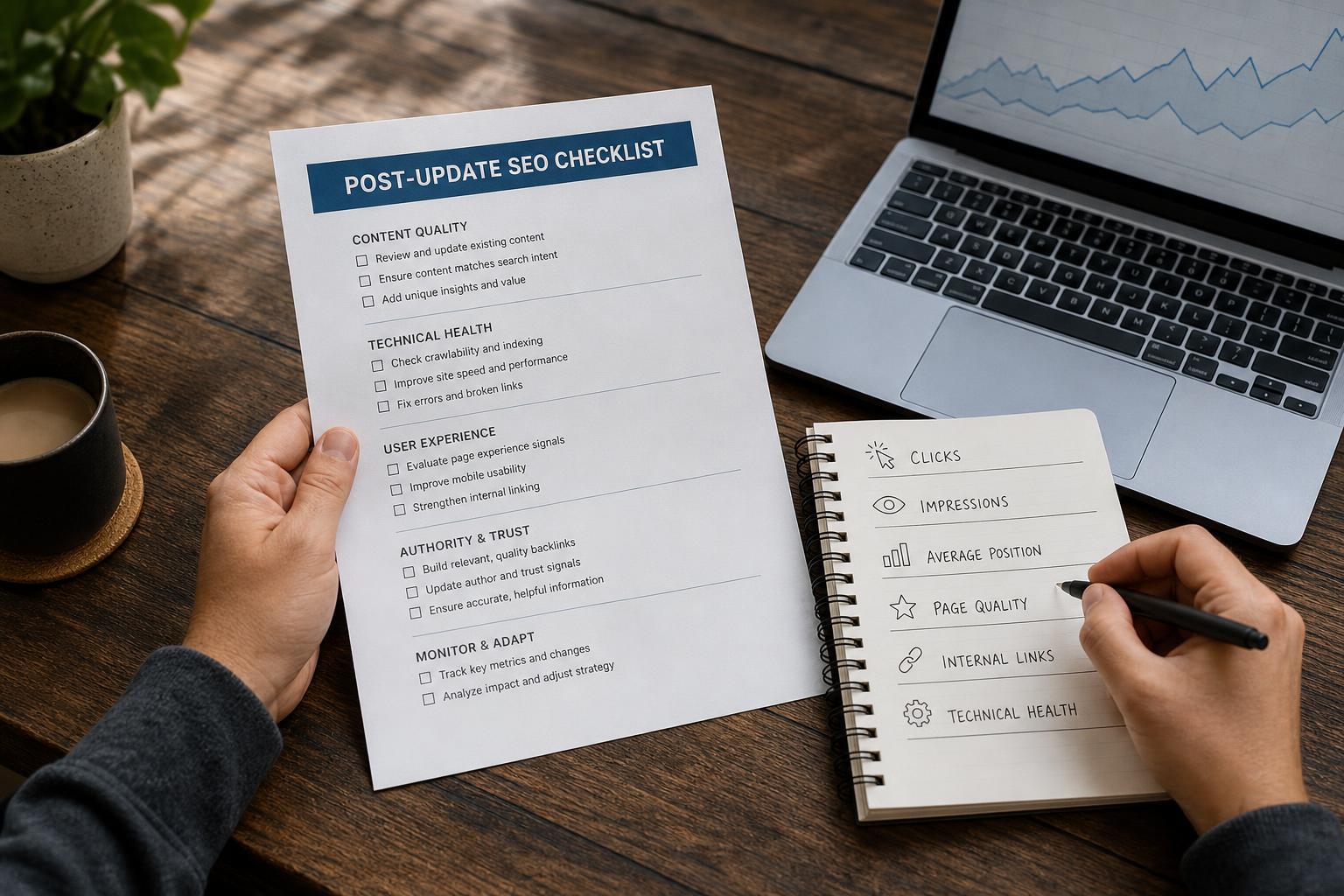
- Post-update SEO checklist for business owners
- Frequently Asked Questions
- Take a measured approach to the Google November 2026 core update
The Google November 2026 core update is a broad change to Google Search systems. While a core update is live, avoid rushed SEO changes that make it difficult to tell whether Google’s reassessment or your own edits caused a result. Record a baseline, wait for the rollout to finish, then allow a stable comparison period before drawing conclusions.
What is the Google November 2026 core update?#
The Google November 2026 core update is a broad change to Google Search systems. Core updates can change how Google evaluates and orders many types of pages, so some websites may gain visibility, some may lose visibility, and others may see little measurable change.
A movement does not automatically prove that a page is poor, broken, or subject to a manual penalty. The right response is usually a careful review of patterns, not an emergency rewrite of every page that moves down.
What should you verify about the November 2026 rollout?#
Check Google’s official Search Status Dashboard for the current rollout status, start and completion information, scope, and expected duration. Treat those dashboard details as the confirmed timeline. Recommendations such as creating a baseline and reviewing one page group at a time are practical guidance for making better decisions, not promises about how any website will perform. Source: Timeline of Google Search.
| Item | What to verify | What it means for your business |
|---|---|---|
| Start | The date and time shown in Google’s official status information | Use the confirmed start point when creating before-and-after comparisons. |
| Scope | The countries, languages, and Search surfaces included in the announcement | International and multilingual websites should segment their analysis accordingly. |
| Duration | The rollout status and completion notice | Daily changes while the rollout is active should be treated as provisional. |
| Type | Whether Google identifies the change as a broad core update | Do not assume that a ranking decline is a page-specific penalty. |
Third-party tracking tools and SEO publications can help you notice patterns, but they should not replace Google’s official status information.
Why should you avoid rushed SEO changes during the rollout?#
While a core update is live, Google’s systems may still be changing. Large edits made at the same time can hide the real cause of a ranking or traffic movement, so it is safer to document what you see, fix clear technical problems, and postpone broad content changes until the rollout has finished. Source: Download documents.
Rushed changes make cause and effect unclear#
Suppose a service page loses clicks during the rollout. If you rewrite its introduction, change the title, add internal links, remove sections, and alter the template at the same time, you may not know which event affected later performance. The update, your edits, seasonality, or a tracking problem could all be involved.
A change log protects your analysis. Record the URL, date, edit, reason, and expected outcome. If a change is necessary, make it specific and document it instead of changing many variables at once.
What can you safely do during the rollout?#
- Monitor Google’s official status information and note when the rollout is complete.
- Export or record current Search Console data for important pages and queries.
- Fix obvious outages, broken redirects, accidental noindex tags, or indexing failures.
- Check whether analytics, consent settings, or tracking code changed.
- Continue normal business activity and planned publishing, but avoid a sitewide panic rewrite.
For a broader process for interpreting ranking movements, see this guide to interpreting Google Search rank. The goal is to identify patterns instead of reacting to one ranking number.
When should you compare performance after the update?#
Wait until Google confirms that the rollout has ended, then allow at least one full week before drawing conclusions. Compare a post-update period with a comparable pre-update period, while accounting for seasonality, promotions, outages, holidays, and changes to tracking or website structure.
A practical post-update timeline#
- Before editing: Record your baseline and note the rollout status.
- While the rollout is active: Monitor trends, but avoid broad conclusions from daily fluctuations.
- When Google confirms completion: Record the completion date and keep monitoring.
- After one full stable week: Begin your main comparison and page-level review.
- After the review: Prioritize a small number of meaningful improvements and document them.
A useful comparison might examine seven days after the waiting period against the same number of days before the rollout began. A longer comparison can be more reliable when your business has weekly or seasonal demand changes.
How should you compare Search Console data?#
Use Google Search Console to compare clicks, impressions, click-through rate, and average position across the same pages, queries, countries, devices, and search types. Look for groups of related URLs or queries that changed together instead of treating one page or one day as proof of an update impact. For a broader workflow, see this Search Console SEO strategy.
Start with the Performance report#
Review the Web Search type first, then check Images, Video, and News separately if those surfaces matter to your business. A change in Web Search may tell a different story from a change in image visibility or video impressions.
Break the report down by:
- Important landing pages
- Branded and non-branded queries
- Service, product, informational, and local query groups
- Country and device
- Clicks, impressions, click-through rate, and average position
Google recommends checking top pages and queries and distinguishing a small position change from a large one. A drop from position 3 to position 4 may have a different business effect from a drop from position 8 to position 28, even if both appear as a decline.
Separate an update pattern from another problem#
A broad decline across many pages and query groups may be consistent with an algorithmic change, but it is not proof by itself. A sudden drop limited to one directory may point to a deployment issue, a template change, a robots rule, a canonical problem, or a tracking failure.
Check your analytics and Search Console together. Also review:
- Website uptime and server errors
- Recent migrations, redesigns, or CMS releases
- Changes to analytics, consent, or conversion tracking
- Manual actions and security notifications
- Seasonal demand, promotions, news events, and changes in your market
For a more detailed measurement workflow, use this Google SEO measurement guide.
How should you review pages affected by the update?#
Review affected pages for usefulness, relevance, search intent, originality, accuracy, accessibility, and clear next steps. Compare the page with the needs behind the query, not only with competitor word counts. A ranking decline is a reason to investigate the page and its search context, not an instruction to delete it.
1. Check whether the page satisfies search intent#
Search intent is the likely goal behind a query. Someone searching for a local service may need service details, location information, trust signals, and a way to contact the business. Someone searching for a definition may need a clear explanation before they need a product offer.
Ask whether the page answers the main question early, uses terms that match the topic naturally, and gives the reader enough detail to take the next sensible step. If the page targets several unrelated intents, consider whether the information should be reorganized or divided into clearer resources.
2. Review content quality and usefulness#
Look for evidence that the page was made for people rather than only for search engines. Check whether it contains specific information, clear explanations, accurate claims, helpful examples, and an appropriate level of detail.
Remove unsupported claims, outdated instructions, repeated filler, and sections that do not help the reader. Do not add text simply to increase length. A shorter page can be stronger when it answers the real question directly.
3. Check relevance and page focus#
Make sure the title, headings, opening paragraph, body content, and call to action all support the same topic. If a page ranks for queries that are only loosely related, decide whether it needs a clearer focus or whether a separate page would better serve that audience.
4. Inspect internal links#
Internal links help visitors and search engines discover related content. Check that important pages are linked from relevant parts of your site, that anchor text describes the destination, and that links do not point to outdated, redirected, or unrelated URLs. For practical guidance, review these internal linking best practices.
Do not add links everywhere as a reaction to a ranking change. Improve the site’s structure where a real relationship exists. A useful internal linking strategy connects related pages without creating a confusing link network.
5. Check technical health and indexability#
Technical health is not a substitute for useful content, but technical problems can prevent good pages from being crawled, indexed, or displayed correctly. Review the affected URLs for:
- Indexing status and coverage issues
- Accidental noindex directives
- Robots.txt blocks that affect important resources
- Incorrect canonical tags
- Broken links, redirects, and status codes
- Mobile usability problems
- Slow or unstable page loading
- Duplicate or near-duplicate versions
Inspect the live URL in Search Console when a page has an unexpected indexing change. Fix confirmed technical errors first. Avoid changing technical elements that are working simply because a page moved during the update.
Should you delete pages that lost rankings?#
No. A ranking decline alone is not enough reason to delete a page. First determine whether the page has a clear audience, useful information, valid business value, and a fixable mismatch with search intent. Improve, consolidate, redirect, or remove content only when the evidence supports that decision.
Consider keeping and improving a page when it:
- Serves a real customer or audience need
- Has relevant traffic, leads, assisted conversions, or internal value
- Contains information that can be made clearer or more accurate
- Supports a service, product, or topic that the business genuinely covers
Consider consolidation when several pages cover the same intent and none has a clear purpose. Consider removal when a page is obsolete, misleading, empty, or has no reasonable audience and no useful role. Preserve relevant content and redirect carefully when consolidation is appropriate.
What should you do if rankings dropped after the update?#
If rankings dropped after the Google November 2026 core update, confirm the timing, measure the size of the change, identify affected page and query groups, and review those pages against user needs. Make focused improvements only after ruling out technical, tracking, seasonal, and business-related explanations. Do not promise or assume a recovery from any single edit.
- Confirm the timeline: Compare the movement with Google’s rollout status and completion notice.
- Measure the pattern: Identify whether the change affects one URL, one topic group, one country, or the whole site.
- Check for site problems: Review indexing, uptime, redirects, analytics, and recent releases.
- Review the affected pages: Assess usefulness, accuracy, relevance, intent, internal links, and page experience.
- Prioritize improvements: Start with changes that clearly help visitors, not changes designed only to manipulate a ranking signal.
- Document and monitor: Record what changed and allow enough time to evaluate the result.
Google’s guidance does not guarantee that making changes will restore previous positions. Search results can continue to change, and a page may need to become more useful relative to the current results rather than simply return to an earlier position.
How can business owners manage the review process?#
Business owners can make post-update SEO work more manageable by separating monitoring from editing. Assign one person to maintain a change log, create a short list of affected pages, and approve only changes tied to a clear user or technical problem.
UpliftAI can support this type of approval-based workflow with Search Console data, content planning, on-page optimization, internal linking, and publishing controls. Its role is to help organize and execute SEO work, not to predict Google’s decisions or guarantee an outcome. Business owners should review proposed changes before publication.
For businesses that want ongoing help with content and Search Console-informed SEO, see UpliftAI’s SEO services for small businesses. Keep the post-update review evidence-based, whether you do the work internally or use a platform.
Post-update SEO checklist for business owners#
Use this checklist after Google confirms that the rollout is complete and one full week has passed.
- Record the official rollout start and completion dates.
- Export Search Console performance data for key pages and query groups.
- Compare equivalent periods before and after the update.
- Review clicks, impressions, click-through rate, and average position.
- Separate Web, Images, Video, and News performance where relevant.
- Group affected URLs by topic, intent, template, and business purpose.
- Check for tracking changes, outages, migrations, and seasonal demand shifts.
- Inspect indexing, noindex directives, canonical tags, redirects, and mobile usability.
- Review whether each page answers its target search intent clearly.
- Improve accuracy, originality, usefulness, and clarity where evidence supports it.
- Check relevant internal links and remove broken or misleading links.
- Avoid deleting pages solely because their rankings declined.
- Document each meaningful change and its reason.
- Monitor future trends without treating one day of data as a conclusion.
Frequently Asked Questions#
What is the Google November 2026 core update?#
The Google November 2026 core update is a broad change to Google Search systems. It can change visibility for many websites and queries without being a penalty aimed at a particular business. Check Google’s official status information for the current rollout details.
When did the November 2026 Google core update start?#
Use Google’s official Search Status Dashboard to verify the start date and time. Once confirmed, use that point as the starting line for a performance baseline, but wait for the rollout to end before making a main before-and-after comparison.
How long will the November 2026 core update take?#
Google’s official status information provides the current rollout estimate and completion notice. Actual effects can appear unevenly while systems process a broad change, so daily ranking movements are not a reliable basis for major decisions.
Does the November 2026 core update affect all countries and languages?#
Check the official rollout information for the countries and languages included. If international visibility matters, compare performance by country, language, device, query group, and landing page instead of relying on an overall site average.
Is a Google core update a penalty?#
A core update is not automatically a penalty. Broad changes to Search systems and manual actions are separate events. A decline can indicate that Google’s systems now assess the competitive results differently, but you should still check for technical problems and manual-action notifications.
Should I change my website during a Google core update?#
Fix clear technical errors and urgent business problems during the rollout, but avoid broad, rushed SEO changes. Changing titles, content, templates, links, and technical settings at once makes attribution difficult. Record your baseline, wait for the rollout to finish, and review the evidence before making focused improvements.
How do I know if my website was affected by a core update?#
Compare Search Console trends before and after the confirmed rollout, using equivalent periods and page or query groups. Look for sustained changes in clicks, impressions, click-through rate, and average position. Also rule out seasonality, tracking changes, outages, migrations, indexing problems, and changes in customer demand.
Take a measured approach to the Google November 2026 core update#
Use Google’s official rollout status to establish the relevant dates, avoid panic edits while the update is live, and allow a stable comparison period after completion. Then compare Search Console trends, review affected pages for usefulness and intent, and check internal links and technical health. The best next step after the Google November 2026 core update is a documented, focused review rather than a promise of rankings or traffic gains.